

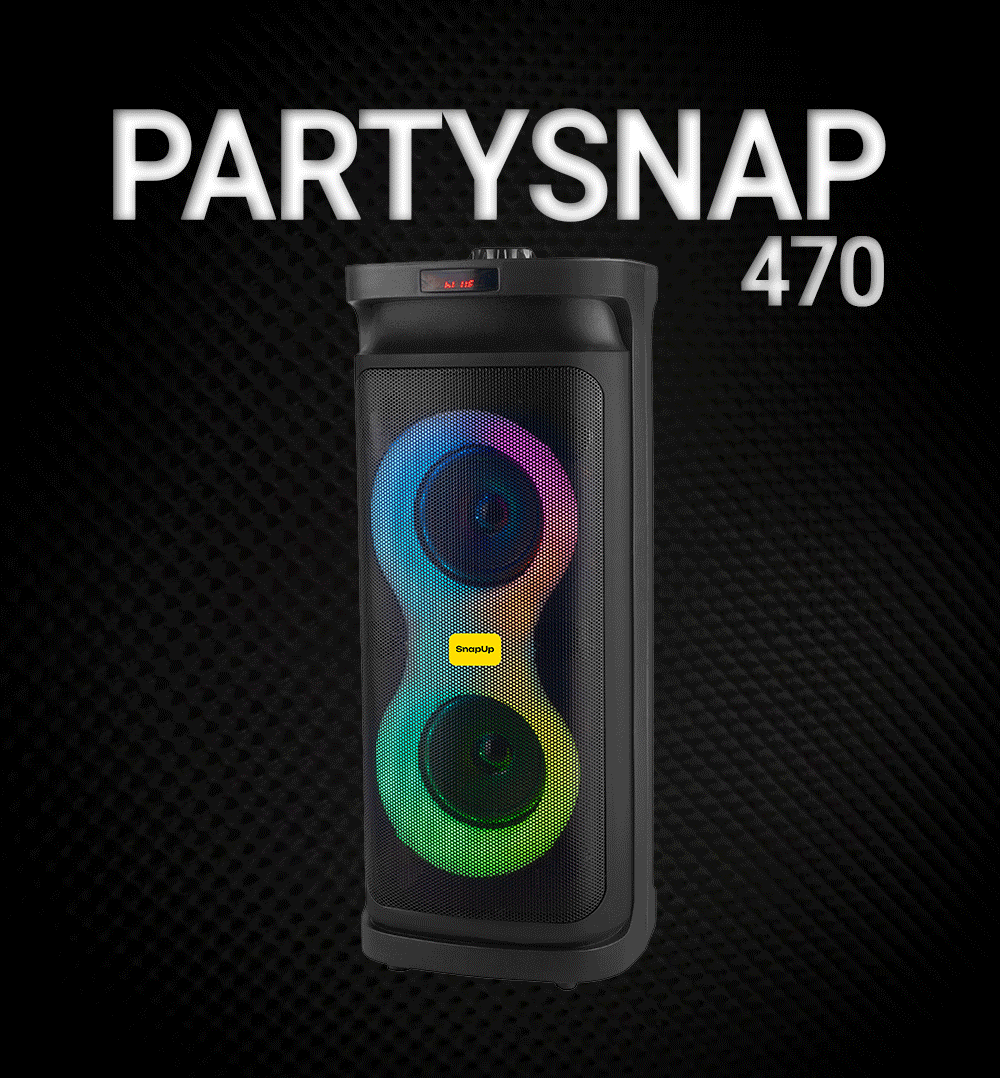
SnapUp PartySnap 470 — 48W Party Speaker
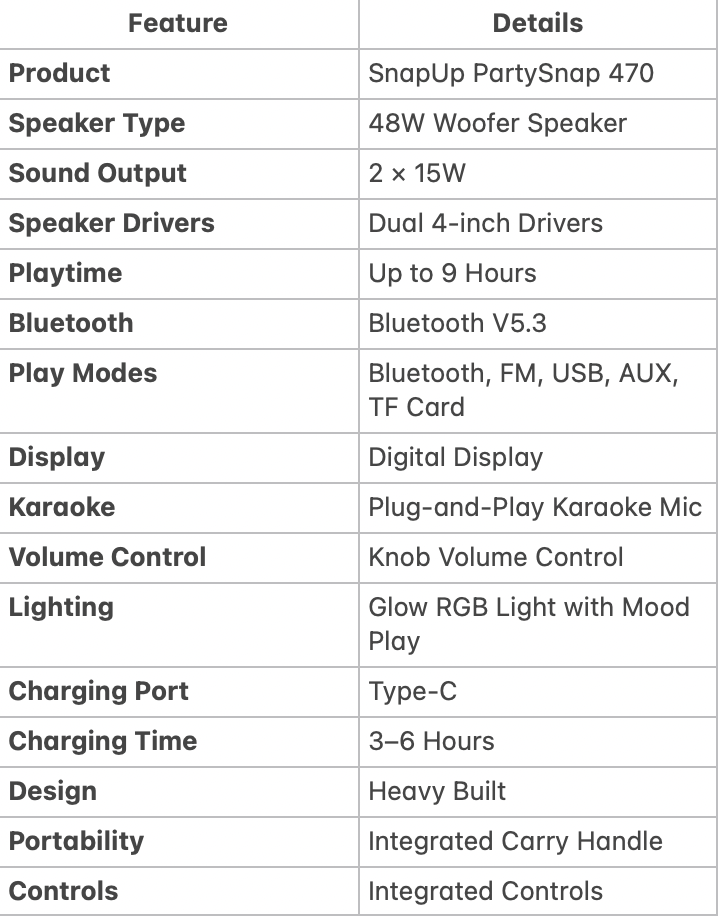
The SnapUp PartySnap 470 is a powerful 48W Bluetooth woofer speaker designed for music, parties, karaoke and everyday entertainment. With dual 4-inch speaker drivers and 2×15W sound output, it delivers dynamic sound and crystal-clear notes for an immersive listening experience.
The PartySnap 470 offers up to 9 hours of playtime and supports multiple playback options including Bluetooth V5.3, FM, USB, AUX and TF Card. Its digital display makes it easy to identify the selected mode and Bluetooth connection status, while integrated controls provide convenient access to playback and volume functions.
For parties and gatherings, the speaker features Glow RGB Lights with Mood Play and a plug-and-play karaoke microphone. You can change the LED reflections or turn the LED lights off according to your preference.
The heavy-built portable design comes with a carry handle, making the PartySnap 470 convenient to move between rooms, gatherings and entertainment spaces.
What's Included / Key Features
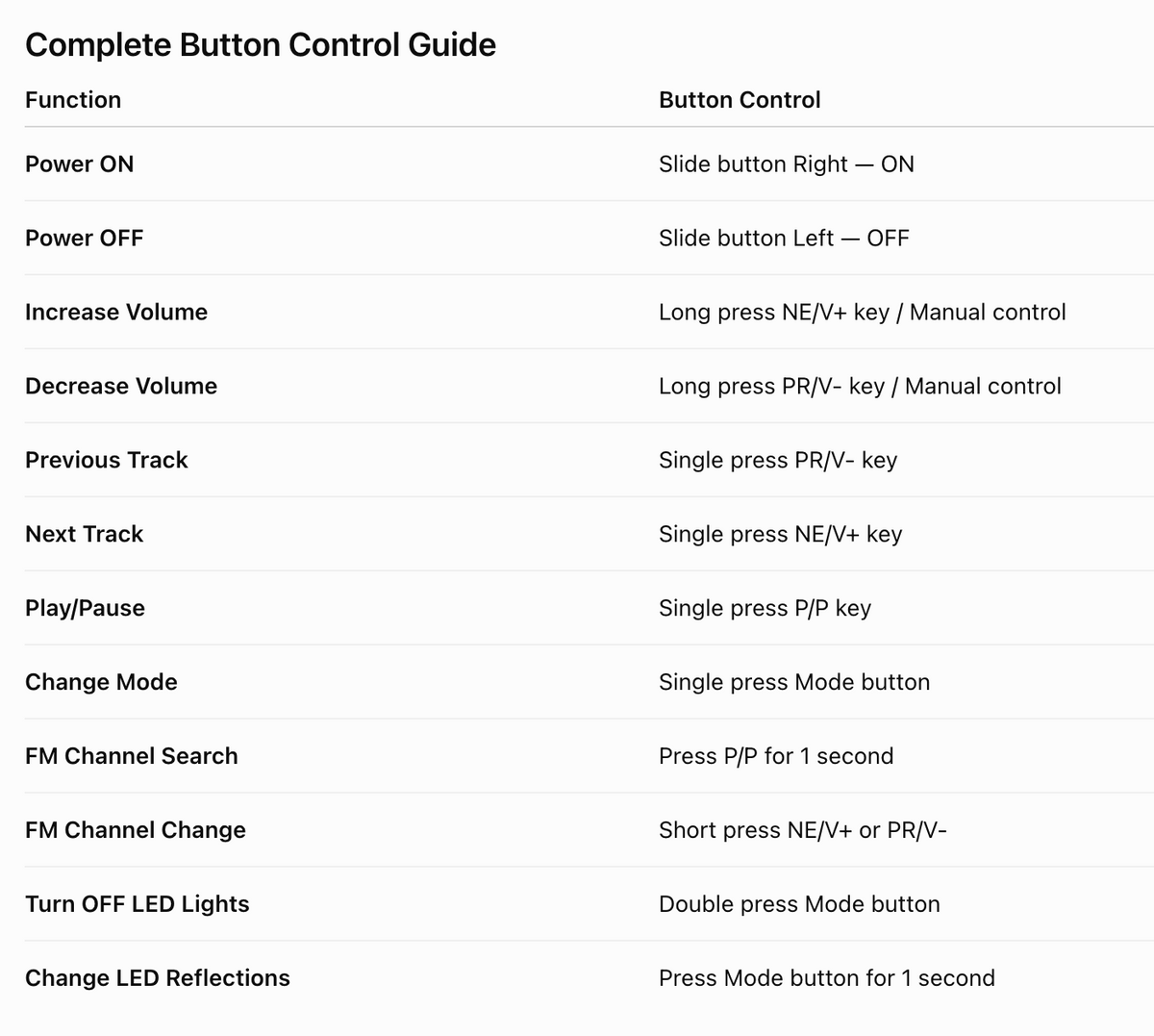
How to Switch the PartySnap 470 On & Off
Power On
Slide the Power button to the right to turn the speaker ON.
Power Off
Slide the Power button to the left to turn the speaker OFF.
Tip
Always switch the speaker off when it is not being used for an extended period.
How to Connect PartySnap 470 via Bluetooth
The PartySnap 470 supports Bluetooth V5.3 for wireless music playback.
Step 1: Turn On the Speaker
Slide the Power button to the right.
Step 2: Enter Bluetooth Mode
Use the Mode button to select Bluetooth mode if required.
Step 3: Check the Display
During the Bluetooth pairing process, “BT” blinks on the digital display.
Step 4: Pair Your Device
Open Bluetooth settings on your smartphone, tablet or compatible device and select the PartySnap speaker for pairing.
Step 5: Confirm Connection
Once the speaker is connected, the “BT” blinking stops on the display.
Your speaker is now ready for Bluetooth music playback.
Bluetooth Pairing Status
The PartySnap 470 uses the digital display to indicate its Bluetooth status.
StatusDisplay IndicationBluetooth Pairing“BT” blinking on displayBluetooth Connected“BT” blinking stops
Bluetooth Tip
If your device does not connect, check that Bluetooth is switched on and that the speaker is available for pairing.
How to Control Volume
The PartySnap 470 provides multiple ways to control volume.
Increase Volume
Long press the NE/V+ key to increase the volume.
The volume can also be controlled using the manual/knob volume control.
Decrease Volume
Long press the PR/V- key to decrease the volume.
The manual/knob volume control can also be used for volume adjustment.
How to Change Tracks
The PartySnap 470 allows you to move between songs using the control buttons.
Previous Track
Single press the PR/V- key to go to the previous track.
Next Track
Single press the NE/V+ key to move to the next track.
Important Control Difference
- Long press → Volume control
- Single press → Track selection
This makes it easy to control playback without reaching for your connected smartphone.
How to Play & Pause Music
To play or pause music:
Single press the P/P button.
This provides quick access to playback control while listening to music through the speaker.
How to Change Modes on PartySnap 470
The PartySnap 470 supports multiple playback modes:
- Bluetooth
- FM
- USB
- AUX
- TF Card
To change between modes:
Single press the Mode button.
Continue pressing the Mode button to move between the available playback modes.
How to Use FM Radio
The PartySnap 470 includes an FM mode for listening to FM radio without requiring Bluetooth music playback.
FM Channel Search
Press and hold the P/P button for 1 second to start the FM channel search.
Change FM Channel
Use the following buttons to move between FM channels:
- Short press NE/V+ → Next channel
- Short press PR/V- → Previous channel
Quick FM Guide
Function | Button Control
FM Channel Search | Press P/P for 1 second
Next FM Channel | Short press NE/V+
Previous FM Channel | Short press PR/V-
How to Use USB, AUX & TF Card
The PartySnap 470 supports multiple music playback options beyond Bluetooth.
Bluetooth
Connect compatible devices wirelessly using Bluetooth V5.3.
USB
Use a compatible USB storage device to play supported music files.
AUX
Connect a compatible audio source through the AUX connection.
TF Card
Insert a compatible TF Card containing your music files.
Changing Playback Source
Single press the Mode button to switch between available playback modes.
How to Control the RGB Lights
The PartySnap 470 features Glow RGB Lights with Mood Play, designed to add a visual element to your music and parties.
There are two dedicated lighting controls.
Turn Off LED Lights
Double press the Mode button to turn the LED lights OFF.
Change LED Reflections
Press and hold the Mode button for 1 second to change the LED light reflections.
This allows you to customise the visual experience according to your preference.
PartySnap 470 RGB Light Controls
Lighting Function | Button Control
Turn OFF LED Lights | Double press Mode button
Change LED Reflections | Press Mode button for 1 second
Turn Lights Back On | Use the Mode control as applicable
The supplied control information specifies how to turn the LEDs off and change LED reflections. It does not specify a separate dedicated button for turning the lights back on, so this page should not claim a specific restart sequence unless confirmed in the product manual.
How to Charge PartySnap 470
The PartySnap 470 features a Type-C charging port.
Charging
Connect the speaker to a suitable power source using the Type-C charging connection.
During charging:
Red light glows.
Fully Charged
When charging is complete:
Red light turns OFF.
Charging Time
The specified charging time is approximately 3–6 hours.
Playtime
The PartySnap 470 provides up to 9 hours of playtime, depending on usage conditions.
Volume level, lighting usage and playback mode can affect actual battery performance.
PartySnap 470 Charging Indicators
Speaker StatusIndicatorChargingRed light ONFully ChargedRed light OFF
How to Use the Karaoke Microphone
The PartySnap 470 comes with a plug-and-play karaoke microphone, making it suitable for singing, parties, family gatherings and entertainment.
Basic Use
- Switch on the PartySnap 470.
- Connect/use the supplied karaoke microphone as intended.
- Start your music or karaoke track.
- Use the speaker's controls to adjust the music volume.
The available specifications confirm that the microphone is plug-and-play. Specific microphone volume, echo or independent microphone-control functions have not been specified, so these should not be added to the support page unless confirmed in the detailed user manual.
Useful Tips for Better PartySnap 470 Experience
- Charge the speaker fully before extended use.
- Keep the speaker within a suitable range of the connected Bluetooth device.
- Use Bluetooth V5.3 for convenient wireless playback.
- Use the Mode button to select Bluetooth, FM, USB, AUX or TF Card playback.
- Use the digital display to monitor Bluetooth pairing status.
- Use the manual knob for convenient volume adjustment.
- Use the RGB lighting controls to customise the party atmosphere.
- Turn off the LED lights when you want to conserve battery during use.
- Use the carry handle when moving the speaker.
- Avoid exposing the speaker to conditions not specified for its operation.
- Keep the charging port clean and dry.
- Disconnect the speaker from charging once it is fully charged.
Cleaning & Maintenance
How to clean the PartySnap 470?
- Switch off the speaker before cleaning.
- Disconnect it from the charging source.
- Use a soft, dry or slightly damp cloth to clean the exterior.
- Do not pour or spray liquid directly onto the speaker.
- Keep the Type-C charging port dry.
- Do not use abrasive cleaning materials.
- Keep the speaker in a clean and dry location when not in use.
Important
The PartySnap 470 is an electronic speaker. Do not immerse it in water or expose its charging and electronic components to liquid.
FAQs
How do I turn ON/OFF the SnapUp PartySnap 470?
Slide the Power button to the right to turn the PartySnap 470 ON.
Slide the Power button to the left to turn the speaker OFF.
How do I connect my phone to the PartySnap 470?
Turn on the speaker and select Bluetooth mode. During pairing, “BT” blinks on the digital display. Open Bluetooth settings on your phone and select the PartySnap speaker. Once connected, the BT blinking stops.
Does the PartySnap 470 support Bluetooth 5.3?
Yes. The PartySnap 470 supports Bluetooth V5.3 for wireless music playback.
How do I know if my PartySnap 470 is connected to Bluetooth?
During pairing, “BT” blinks on the display. When Bluetooth connection is established, the BT blinking stops.
How do I increase or decrease the volume?
Long press NE/V+ to increase the volume and long press PR/V- to decrease the volume. The manual volume control can also be used.
How do I change songs on PartySnap 470?
Single press PR/V- to go to the previous track and single press NE/V+ to move to the next track.
How do I play or pause music?
Single press the P/P button to play or pause music.
How do I change between Bluetooth, FM, USB, AUX and TF Card?
Single press the Mode button to change between the available playback modes.
How do I use FM radio on PartySnap 470?
Select FM mode and press the P/P button for 1 second to search for FM channels. Use short presses of NE/V+ or PR/V- to change between channels.
Does the PartySnap 470 have RGB lights?
Yes. The PartySnap 470 features Glow RGB Lights with Mood Play.
How do I turn off the RGB lights? How do I change the RGB light effects?
Double press the Mode button to turn the LED lights off.
Press and hold the Mode button for 1 second to change the LED reflections.
How long does the PartySnap 470 battery last?
The PartySnap 470 provides up to 9 hours of playtime. Actual playtime may vary depending on volume, lighting and playback conditions.
How long does the PartySnap 470 take to charge?
The specified charging time is approximately 3–6 hours.
How do I know when the PartySnap 470 is charging? How do I know when the PartySnap 470 is fully charged?
A red light glows while the speaker is charging.
The red charging light turns off when the speaker is fully charged.
Does the PartySnap 470 come with a karaoke microphone?
Yes. It features a plug-and-play karaoke microphone, making it suitable for karaoke, parties and family entertainment.
Is the PartySnap 470 portable?
Yes. The PartySnap 470 has a heavy-built design with an integrated carry handle, making it easier to move between locations.
How powerful is the PartySnap 470?
The PartySnap 470 is a 48W woofer speaker with dual 4-inch speaker drivers and a 2×15W sound output configuration.
What playback options does PartySnap 470 support?
The speaker supports Bluetooth V5.3, FM, USB, AUX and TF Card, giving you multiple ways to play music.
What does the BT blinking light mean on PartySnap 470?
A blinking “BT” on the digital display indicates the Bluetooth pairing process. Once the speaker connects successfully, the BT blinking stops.
Can I turn off the PartySnap 470 RGB lights while listening to music?
Yes. Double press the Mode button to turn off the LED lights while continuing to use the speaker.
Does the PartySnap 470 come with Warranty?
Yes, PartySnap 470 comes with 1 Year Warranty. To register your device, visit here.